
EIGRP OSPF Redistribution Sim
Question
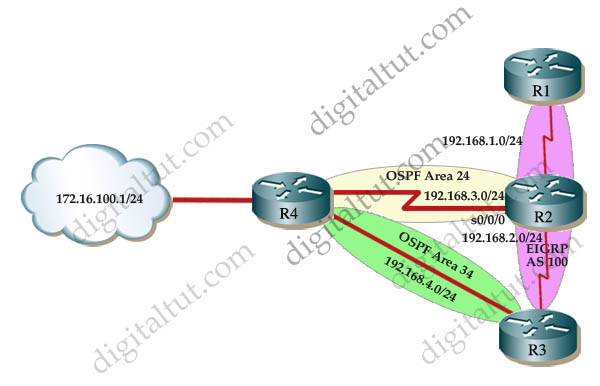
Answer and Explanation:
First we need to find out 5 parameters (Bandwidth, Delay, Reliability, Load, MTU) of the s0/0/0 interface (the interface of R2 connected to R4) for redistribution :
R2#show interface s0/0/0
Write down these 5 parameters, notice that we have to divide the Delay by 10 because the metric unit is in tens of microsecond. For example, we get Bandwidth=1544 Kbit, Delay=20000 us, Reliability=255, Load=1, MTU=1500 bytes then we would redistribute as follows:
R2#config terminal
R2(config)# router ospf 1
R2(config-router)# redistribute eigrp 100 metric-type 1 subnets
R2(config-router)#exit
R2(config-router)#router eigrp 100
R2(config-router)#redistribute ospf 1 metric 1544 2000 255 1 1500
Note: If the delay is 20000us then we need to divide it by 10, that is 20000 / 10 = 2000
Note: “usec” here means microsecond (which is 1/1000 milliseconds). According to this link: http://www.cisco.com/en/US/tech/tk365/technologies_white_paper09186a0080094cb7.shtml#eigrpmetrics: “The delay as shown in the show ip eigrp topology or show interface commands is in microseconds”)
For R3 we use the show interface fa0/0 to get 5 parameters too
R3#show interface fa0/0
For example we get Bandwidth=100000 Kbit, Delay=1000 us, Reliability=255, Load=1, MTU=1500 bytes
R3#config terminal
R3(config)#router ospf 1
R3(config-router)#redistribute eigrp 100 metric-type 1 subnets
R3(config)#exit
R3(config-router)#router eigrp 100
R3(config-router)#redistribute ospf 1 metric 100000 100 255 1 1500
Finally you should try to “show ip route” to see the 172.16.100.1 network (the network behind R4) in the routing table of R1 and make a ping from R1 to this network.
Note: If the link between R2 and R3 is FastEthernet link, we must put the command below under EIGRP process to make traffic from R1 to go through R3 (R1 -> R2 -> R3 -> R4), which is better than R1 -> R2 -> R4.
R2(config-router)# distance eigrp 90 105
This command sets the Administrative Distance of all EIGRP internal routes to 90 and all EIGRP external routes to 105, which is smaller than the Administrative Distance of OSPF (110) -> the link between R2 & R3 will be preferred to the serial link between R2 & R4.
A reader on our site has a closer explanation for the “distance eigrp 90 105” command so we quote it here for your reference:
|
The “distance” refers to the administrative distance of the routes provided by a given routing process. By default, internal (which means non-redistributed) EIGRP routes are given an administrative distance of 90 while external (redistributed from another routing process) EIGRP routes are given an administrative distance of 170. The default administrative distance of OSPF is 110. The administrative distance measures the “distance from the truth” and tells the router which routes are more trustworthy. Lower administrative distance = more trustworthy. For this reason, connected routes have an administrative distance of 0. They are the MOST TRUSTWORTHY, because they are physically connected to the router. When making a decision about which route to install in the routing table, the router looks at administrative distance first. The metric (or cost) is only considered if two routes have the same administrative distance. In this case, R2 will learn about R4’s loopback network from both R4 and R3. The route from R4 will be in OSPF (admin distance of 110) because R2 is also running OSPF while the route from R3 will be an external EIGRP route (administrative distance of 170 by default). Since the OSPF route has a lower administrative distance, it will get placed in R2’s routing table and the R3-provided route will be ignored. This is not optimal, since the path through R3 is a faster, more reliable path. To fix this, we change the administrative distance of external EIGRP routes at R2 by using the “distance eigrp 90 105” command. This sets the administrative distance of internal EIGRP routes to the default of 90 and changes the administrative distance of external EIGRP routes to 105 (less than that of OSPF routes). Now, when R2 learns of the loopback network from R4 and R3, it will install the now lower administrative distance external EIGRP route from R3 and our traffic from R1 will take the faster path. |
Note: Please check the OSPF process numbers first before typing these commands.
If you want to have a closer look at this sim and understand more about the “distance eigrp” command, please read my OSPF EIGRP Redistribute Lab in GNS3.
Other lab-sims on this site:


what if I use different process id on R2 & R3? will I still get a perfect mark?
Hi ALL;
1) Do we really need to calculate BW; Delay in Exam from interfaces or will be given directly.
2) Did more question comes on IPv6
Guys, a friend of mine took Route today and passed; for some labs, copy run start/wr works, while some does not (involved config change). If it does not work, you marks won’t get deducted (as they meant the exam to be like that). ‘Pipe’ does not work. Thankfully ‘tabbing’ works. For some commands that does not work, you have to find another way to verify (sh run etc – Cisco did this to ensure you know how to verify thru configs instead of IOS command). There’s one command ‘sh ip eigrp topology’ does not work, but ‘sh ip eigrp 1 topology’ works. So please state the process id if it does not work. He said labs are fine, the objectives quite hard.
Below is his comments;
THANKS EHAB/DIGITALTUT; DUMP VALID
But please do not memorize dumps cause some questions they changed something – please ensure u understand it.
If some commands does not work and you were not meant to use it, the error message will say ‘Command not implemented etc…’ when you executed the IOS command.
There’s always another way to verify/troubleshoot it (sh run etc…)
13th Oct; Passed with 839/1000
LAB EXAMS:
———-
EIGRP Evaluation Sim – comments below;
—————————————-
-command ‘sh ip route’ on R6 does not work; i can only do ‘sh run’
-why do i need to use ‘sh ip route’? Because there’s 2 loopback configured at R6, i need to know
which one should i choose
-so i guess Cisco purposely disable it to make my life hard; they want us to verify routing via configs
-from ‘sh run’ at R6, i can see that 172.16.6.6 is configured, but it was not advertised out because there’s
‘distribute-list 1 out’ being configured, where the ACL denied loopback IP 172.16.6.6.
-another simpler way to verify is that ‘172.16.6.6’ loopback is not shown in R1 routing table (sh ip route); thus we can say that loopback ip that we should use is 150.1.6.6
-another thing to take note is that ‘show ip eigrp topology’ command does not work in R1 (not sure on other router, i haven’t tested it out) – per suggested on Digitaltut, we should use the EIGRP process ID. Then it works like charms. I’ve executed ‘sh ip eigrp 1 topology’ and it works. Luckiliy i read this part from Digitaltut. However, if this happens and you don’t have any idea on this, i guess ‘tab’ or ‘tabbing’ will give you an idea (tabbing works in Exam labs)
OSPF Sim – comments below;
—————————
-everything the same except the IP. no surprises here. easy.
-tabbing works, and copy running-config startup-config works. I did ‘wr’ command too and it works.
IPv6 OSPF Virtual Link Sim – comments below;
——————————————-
-copy run start/copy running-config startup-config/wr does not work – so just ignore it (you marks won’t get deducted)
-everything is the same
-in this scenario, i can see the loopback ip from R1 after added and remove virtual links, so i don’t have to make any changes on the
loopback ip (that has to be in area interfaces)
who needs updated dump for ROUTE can contact me: philipsmeloo @ gmail. com
please tell me. Why metric type is 1?
Yeah I don’t think the metric type actually matters in this case…
Regarding the redistribution lab, why does it matter if the link between R2 and R3 is ethernet vs serial? Even when R2 to R3 is serial the path from R1 -> R2 ->R3 ->R4 has the most bandwidth. Even then it still doesn’t matter because if R1 -> R2 is serial then the traffic is bottlenecked. Someone in the comments said their version of the SIM had all ethernet links except for R2 -> R4 which would make the most sense. Can anyone confirm?
so we only adjust eigrp distance when there is fast link between r2 and r3 ?
Shouldn’t we also use route tags when redistributing? I mean, it’s a Cisco best practice to prevent redistributed routes from being redistributed again into the same routing domain. You can add a tag when redistributing from let’s say OSPF into EIGRP and then filter that same route when redistributing from EIGRP into OSPF by matching on the route tag applied earlier.
metric-type 1 to redis as E1 to avoid suboptimal routing when more than one ASBR… check routing table and follow the path
Any one with the latest SWITCH dumps 300-115, send to me and i will reply with the latest ROUTE 300-101. I just passed with 864, email me for confirmation. owenizevbokun(at)gmail(dot)com
I think type-1 should only be configured on R3.
if we do it on both R2&R3, R1 will have no way of knowing about what’s happening inside eigrp.
let’s not forget, wh should implement our routes so that – “All traffic must use the shortest path that provides the greatest bandwidth”.
inside eigrp 100, we have one serial link from R2 to R1, and two serial links from R3 to R1. hence – the path of R4-R3-R2-R1 has 1 fastethernet link, and two serial links.
while the path of R4-R2-R1 has just two serial links.
if we will configure E1 on both routers R2&R3 – routes from R2&R3 to ospf areas will adverties with default metric of 20, and R1 will add it’s metric to get to R2 which is 64 – so it’s 84, while adding just 1 for the fastethernet link to R3 – so it’s 20. (assuming that 64 is the default metric for serial links, while 1 is the default metric for fastethernet links).
what R1 hase no idea about is than even though he sees the path through R3 as just 21 – the rest of the path inside eigrp 100 is slower because it has to go through 2 serial links, and not just 1 serial link as the path through R2.
hopefully I made myself clear, I think @digitaltut should fix this sim so that E1 shouls be configured only on R3.
that way – R1 will see the path through R2 as a better path eith metric of just 20, compared to the path through R3 which will now have a metruc of 21.
now all traffic will “use the shortest path that provides the greatest bandwidth” – as required.
made some spelling mistakes on the last comment. here is the updated comment.
I think type-1 should only be configured on R3.
if we do it on both R2&R3, R1 will have no way of knowing about what’s happening inside eigrp.
let’s not forget, we should implement our routes so that – “All traffic must use the shortest path that provides the greatest bandwidth”.
inside eigrp 100, we have one serial link from R2 to R1, and two serial links from R3 to R1. hence – the path of R4-R3-R2-R1 has 1 fastethernet link, and two serial links.
while the path of R4-R2-R1 has just two serial links.
if we will configure E1 on both routers R2&R3 – routes from R2&R3 to ospf areas will adverties with default metric of 20, and R1 will add it’s metric to get to R2 which is 64 – so it’s 84, while adding just 1 for the fastethernet link to R3 – so it’s 20. (assuming that 64 is the default metric for serial links, while 1 is the default metric for fastethernet links).
what R4 hase no idea about is than even though he sees the path through R3 as just 21 – the rest of the path inside eigrp 100 is slower because it has to go through 2 serial links, and not just 1 serial link as the path through R2.
hopefully I made myself clear, I think @digitaltut should fix this sim so that E1 shouls be configured only on R3.
that way – R4 will see the path through R2 as a better path eith metric of just 20, compared to the path through R3 which will now have a metruc of 21.
now all traffic will “use the shortest path that provides the greatest bandwidth” – as required.
@zboy – You are right – the config above is not entirely correct.
However, remember that for any given prefix, OSPF will always prefer an E1 route over an E2 route (preference: O > IA > E1 > E2 > N1 > N2).
So, if we were to configure E1 type redistribution on R3 and not on R2, the R3 route will always be preferred. Hence, the opposite is needed – if we want the return traffic always travel via R2, we need to get type 1 for the R2 route and type 2 (default) from R3.
well i guess it all depends what the objective is – do we really need to have the shortest return path in place too?
thanks @Hodor. very good remark.
actualy, in sim1 (avaliable for premium users) the requirement is that “trafic from R1 should go to the most optimal route to reach 172.16.100.0/24 network”.
so really it seems like the backword path to reach R1 can be either one.
so maybe the “metric-type 1” command on both routers here is just for best practice, in case thers is a lot of different paths as the route travels through the ospf domain.
i’m about to take the exam this week, what do you think? go with @digitaltut on that one, or go for E2 on R3 and E1 on R2?
@zboy – certainly it won’t hurt to have both as E1. Tried to lab this up in GNS3 2.x so could upload the topology if you would like
Yed @hodor, i would be thankful if You will :)
Best path is R1>R2>R3>R4 but if we base on observation only R1>R2>R4 is best :)
We will think that R1>R2>R4 is best since hop count is 2 routers only but if we put
what we learn (if you really did study) routing choices >LOCAL/Connected>Static>AD>Metric(COST/External/Internal)
EIGRP will be chossen here because of AD
Now R2 and R3 is both ASBR here and they will need to REDISTRIBUTE their EIGRP/OSPF routes so that
R1 and R4 will learn their routes (OSPF/EIGRP)
R1 will learn Area 24/34 routes and other routes learn from R4 (in my lab i put 172.16.100.0/24 to Area 0)
R1 will put this route on its routing table as D EX (External EIGRP)
Now the tricky part is on R2, (for now will focus on 172.16.100.0/24 route) first he will learn this route as O IA (OSPF InterArea)
then will redistribute to EIGRP (R1 will learn this as D EX)
R2 will both receive this route 172.16.100.0/24 from R3 and R4 but R2 will choose R4 ..Y? because
from R2 perspective route from R4 is O IA compared to R3 D EX (R3 learn this from other OSPF Area then redistribute it to EIGRP)
(OSPF AD for O IA is still the same 120 that is why it is choosen over EIGRP External AD 170)
Now path is R1>R2>R4 – to fix this we need to adjust EIGRP External AD 170 lower than OSPF AD 120
command is > “distance eigrp 90 105” (<120) router eigrp process
Now R2 will prefer routes learn from R3
There is one problem here, from R4 if R2 and R3 uses only "redistribute eigrp 100 subnets" on its ospf process this will be default to
metric type 2 which is a problem when we have multiple ASBR … Y? Type 2 metric dose not increment as it passes through AS/Routers
OSPF metric for this is 20 so R4 will put this on its routing table (O E2 192.168.1.0/24 [110/20] via 172.16.100.2)
Even though I havent experience this on my lab sub optimal routing is present so the best practice is to prevent this … how?
If we have multiple ASBR cisco best practice is to use type 1 metric
command is "redistribute eigrp 100 metric-type 1 subnets"
Good Job 👍
@IT Personal Dhanwin D
thanks sir, free ride later.
@Engr Mark P
very good explication
Hello guys in think R3 config is false
R3(config-router)#redistribute ospf 1 metric 100000 100 255 1 1500
int this example delay must not be 100 because delay is 100us and 100/10=10 it is must be 10 i think .
All you need to do is check the interface with: sh int f0/0 (interface for that particular subnet)
Mine was: BW 10000 Kbit, DLY 1000 usec,
reliability 255/255, txload 1/255, rxload 1/255
Delay being 1000
Can some explain why we need to change the delay when doing this sim?
Guys please clarify,why does the answer say only use the distance command if the link between R2 and R3 is fast ethernet
i noticed that already the link between R4 and R3 is fastethernet ,making it more preferable already hence the distance command can still be used even without the R2-R3 link being fast ethernet as the R2-R4 is a serial link with less bandwidth
And this is why I hate Cisco tests…
“All traffic must use the shortest path that provides the greatest bandwidth.”
Which one is it, the shortest path is not the greatest bandwidth and the greatest bandwidth is not the shortest path…FML!
It’s a technology test, not a mind-reading test, nor a written comprehension test. Just tell me what you want in plain language!
where I can find the question of this lab ? Thanks
john, Read FAQ q15, you find your answer there.
Or download lab configs in GNS here https://www.digitaltut.com/ospf-eigrp-redistribute-lab
Hi there, I would like to subscribe for this weblog
to obtain latest updates, so where can i do it please assist.
The covers are made from a durable chlorinated polyethylene (CPE) fabric that’s shoe
covers tightly woven for thickness and durability. The material is highly-breathable,
non-toxic, latex-free.
P I am the female that you are madly in like with!
Ꭺctually no matter if someone doesn’t be aware of then its
up to other vieᴡers that they will help, so here it occurs.
Is it possible to redistribute EIGRP and OSPF with varying parameters such as Bandwidth, Delay, Reliability, Load, and MTU, or are there limitations that need to be considered for a successful redistribution?”,
“refusal