
EIGRP Stub Sim
Question
TUT Corporation has just extended their business. R3 is the new router from which they can reach all Corporate subnets. In order to raise network stableness and lower the memory usage and broadband utilization to R3, TUT Corporation makes use of route summarization together with the EIGRP Stub Routing feature. Another network engineer is responsible for this solution. However, in the process of configuring EIGRP stub routing connectivity with the remote network devices off of R3 has been missing.
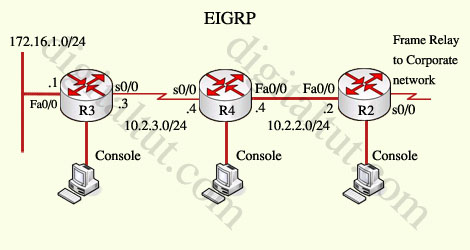
Presently TUT has configured EIGRP on all routers in the network R2, R3, and R4. Your duty is to find and solve the connectivity failure problem with the remote office router R3. You should then configure route summarization only to the distant office router R3 to complete the task after the problem has been solved.
The success of pings from R4 to the R3 LAN interface proves that the fault has been corrected and the R3 IP routing table only contains two 10.0.0.0 subnets.
Answer and Explanation:
First we have to figure out why R3 and R4 can not communicate with each other. Use the show running-config command on router R3
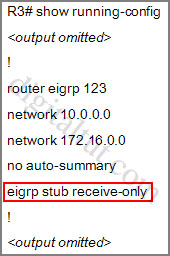
Notice that R3 is configured as a stub receive-only router. The receive-only keyword will restrict the router from sharing any of its routes with any other router in that EIGRP autonomous system. This keyword will also prevent any type of route from being sent.
Therefore we will remove this command and replace it with the eigrp stub command:
R3#configure terminal
R3(config)#router eigrp 123
R3(config-router)#no eigrp stub receive-only
R3(config-router)#eigrp stub
R3(config-router)#end
Now R3 will send updates containing its connected and summary routes to other routers. Notice that the eigrp stub command equals to the eigrp stub connected summary because the connected and summary options are enabled by default.
Next we will configure router R3 so that it has only 2 subnets of 10.0.0.0 network. Use the show ip route command on R3 to view its routing table
R3#show ip route
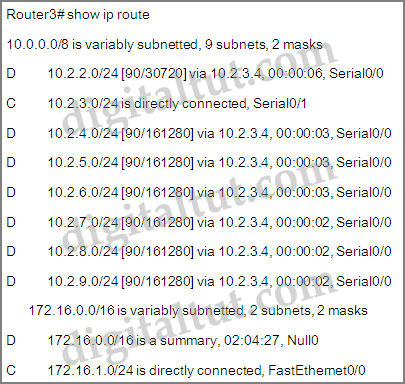
Because we want the routing table of R3 only have 2 subnets so we have to summary sub-networks at the interface which is connected with R3, the s0/0 interface of R4.
There is one interesting thing about the output of the show ip route shown above: the 10.2.3.0/24, which is a directly connected network of R3. We can’t get rid of it in the routing table no matter what technique we use to summary the networks. Therefore, to make the routing table of R3 has only 2 subnets we have to summary other subnets into one subnet.
In the output if we don’t see the summary line (like 10.0.0.0/8 is a summary…) then we should use the command ip summary-address eigrp 123 10.2.0.0 255.255.0.0 so that all the ping can work well.
In conclusion, we will use the ip summary-address eigrp 123 10.2.0.0 255.255.0.0 at the interface s0/0 of R4 to summary.
R4>enable
R4#configure terminal
R4(config)#interface s0/0
R4(config-if)#ip summary-address eigrp 123 10.2.0.0 255.255.0.0
Now we jump back to R3 and use the show ip route command to verify the effect, the output is shown below:
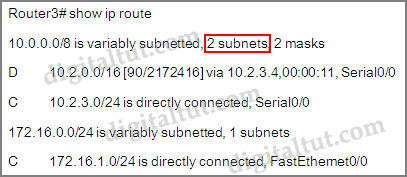
(But please notice that the ip addresses and the subnet masks in your real exam might be different so you might use different ones to solve this question)
But in your real exam, if you see the line “10.0.0.0/8 is a summary,….Null0” then you need to summary using the network 10.0.0.0/8 with the command “ip summary-address eigrp 123 10.0.0.0 255.0.0.0” . This configuration is less optimize than the first but it summaries into 2 subnets as the question requires (maybe you will not see this case, don’t worry!).
The command “copy running-config startup-config” will not work so try using this command; just skip if it doesn’t work.
Other lab-sims on this site:


Dear Guys,
Yesterday I passed with 8XX the exam 300-101!! and this question was in the exam, regards from Peru.
I have this loaded in GNS3 & I never only get two subnets on R3. Here’s the output of the on R3:
10.0.0.0/8 is variably subnetted, 3 subnets, 3 masks
D 10.0.0.0/8 [90/2170112] via 10.2.3.4, 00:00:15, Serial1/0
C 10.2.3.0/24 is directly connected, Serial1/0
L 10.2.3.3/32 is directly connected, Serial1/0
172.16.0.0/16 is variably subnetted, 2 subnets, 2 masks
C 172.16.1.0/24 is directly connected, GigabitEthernet4/0
L 172.16.1.1/32 is directly connected, GigabitEthernet4/0
Why “R4(config-if)#ip summary-address eigrp 123 10.2.0.0 255.255.0.0”??
I think “R4(config-if)#ip summary-address eigrp 123 10.2.0.0 255.255.240.0”
Anonymous October 22nd, 2018
Why “R4(config-if)#ip summary-address eigrp 123 10.2.0.0 255.255.0.0”??
I think “R4(config-if)#ip summary-address eigrp 123 10.2.0.0 255.255.240.0”
Dude this is totally wrong, you are making a route summery with is supposed to put all the subnets in two,
Today’s exam 834 score, Lab eigrp – ospf – redistribute-Drag – Drops Frame-Relay – GRE – Trafic
R4(config-if)#ip summary-address eigrp 123 10.2.0.0 255.255.0.0 correto
@BROS agreed with you this command ip summary-address eigrp 123 10.2.0.0 255.255.0.0” may advertised the lab requirement but maybe you will not get full marks command should be ip summary-address eigrp 123 10.2.0.0 255.255.240.0” to get your full marks .
We have not a problem with the ip 10.2.3.0/24 ? This IP is on port S0/1, not S0/0 like all the other.
After the summary 10.2.0.0 255.255.240.0 the ip route table have the same IP directly connected but on s0/1. I think is right, but I don’t understand.
@all
I have exacly this lab on the exam today and the summary /20 don’t works. With the /16 it’s was Ok.
And there is not other serial interface on R1
I had this question on my exam this week and I was using the /20 mask for summarization but the command did not work.
@ddowner the objective is to have just two “10.0.0.0” subnets in the IP routing table. You have 3, so You are probably not summarizing properly.
10.2.3.3/32 is a host, not a subnet, so it doesn’t count. The question requests 2x 10.0.0.0 *subnets* in the routing table. The reason why it appears is that newer IOSes (>15.0) show the local interface IPs as /32 hosts and their subnets as separate entries in the routing table.
The summary subnet mask shouldn’t matter *in theory* as long as it covers all the loopback IPs from R4. As a general thumb of rule, in a real environment I would use the most specific mask, which is /20, not /16.
Probably reason for multiple sub nets is you are configuring it on different router, you have to configure it on R4.
I’ve taken this test recently and noticed that after replacing “eigrp stub receive-only” with “eigrp stub” that a show ip route already shows only two 10.0.0.0 subnets, without having to add any summarization. Have they changed the lab? I forgot to check the output of show ip route before modifying the stub command, but after changing it my routing table for R3 looked exactly like the one in this lab after the summarization, but without me doing the summarization.
I am planing to take CCNP exams soon. Can you help me with CCNP dumps please
E: msbtechsolution @ gmail . com
*** FOR ANYONE CONCERNED THAT THEY ARE SEEING “3 subnets” not “2 subnets” ***
You are likely using a newer IOS version or simulated IOS version, which now includes the actual interface IP address in the output.
I have configured 3 sets of simulations identically:
– Packet tracer
– GNS3 with a 7200 image
– GNS3 with c2691, version 12.4
The packetracer and 7200 image version that I have both show the 10.2.3.4/32 “L” (local interface) as a subnet under 10.0.0.0/8.
The 2691 version 12.4 image does not display the 10.2.3.4/32 network in the output.
I believe modern IOS images have simply changed their behaviour so the question’s objective of 2 subnets is not attainable on newer firmware.
if this command -copy running-config startup-config- does not work, what then will work to save config
I took the test a few days ago.
But in the real lab default is 8 subnets not 9. But when using the “ip summary-address eigrp 123 10.2.0.0 255.255.0.0” command, there is only 1 subnet left on R3. Can anyone explain how to help me?
I think I failed this lab.
Hi All,
I got this SIM in my exam yesterday 11.02.2019. In the sim no matter what i did may it be /8 or /16 or /20 route the routing table on R3 was just going crazy. at times it will show the correct output and then it will suddenly revert back to its original routing table where it shows all the routes as individual /24 routes. i had to remove the ip summery-address command from the interface and put it back in again for it to show me a proper output. even then i could not get route showing 2 subnets only. i was getting route showing 3 individual subnets even when the subnet advertised is a /16 or /8.
in the end i spent 40 min troubleshooting the dam thing and gave up and left it as a /16 route . i just hope it was a bug in the sim.
in the end i passed the paper but im still just curious about this lab. if i run this in my EVE-NG lab i get similar output to the cisco exam excluding the routing table going crazy. in this lab no matter what i do that directly connected 10.2.3.0/24 subnet not summarizing
I think i found the selution. Please if anyone is taking the exam anytime soon (February 2019) Please let me know if this works
the solution is as followed
Router 3
=============
No eigrp stub
!
eigrp stub
!
end
=============
Router 4
=============
interface Serialx/x (towards R3)
ip summary-address eigrp 123 0.0.0.0 0.0.0.0
!
end
Basically im telling Router 4 to send a summery of 0.0.0.0 any other route which is not submersed will become a default route and it will tell router 3 that any route for 10.0.0.0/8 is a default route to the next hop
the question did not say you cannot have a default route it just ask to ensure that R3 only see 2 subnet in its routing table
Here is my output
http://oi66.tinypic.com/35a9d12.jpg
“ip summary-address eigrp 123 10.2.0.0 255.255.240.0” command would be the most efficient way to summarize this. It is Cisco best practice.
That being said, the simlets on the exams are not real Cisco IOS so it may not be programmed to take that command so if it doesn’t please use;
“ip summary-address eigrp 123 10.2.0.0 255.255.0.0”
Both are correct, the former is more efficient.
NB. The directly connected route will always remain in the routing table.
in exam it said ping from r2 tot r3 ?
in exam it said ping from r2 tot r3 ? does the same config aply then?
I have passed CCNP ROUTE 300-101 on March 1st 2019 and going to take SW & TS soon.
Dump IP helper which I used is 95% valid.
Anyone who needs can reach me at: hieutrung216 at gmail dot com
I failed the exam yesterday. Got just 592. I want to retake next week. Please help email me kchambwa at gmail dot com
Hello everyone, Pls am taking the 300 101 this week, Please help me the latest dumps. Thanks
Ibjunior2002 at gmail dot com
827 points
lab: ospf-eigrp redistribution, PBR
sim: OSPF Evaluation
DnD:aaa x 3, adverse network conditions
bunch of pppoe/tunnel question which i don’t familiar with.
5 to 7 new questions
find this site 3 days before test. a great help to pass the test.
email: philipsmeloo @gmail .com
I see several people complaining about the summarization did not work, did you check the IOS version? maybe no auto-summary will resolve your issues….
HERE YOU GO. Passing exam.
CCNA 200-125
CCNP ROUTE 300-101
CCNP SWITCH 300-115
CCNP TSHOOT 300-135
CCIE R&S 400-101
AT BELOW LINK:
R E M O V E-S P A C E S
t2 m . io/qkhTw5dQ
Btw, who needs DUMP can reach me at: network4career(at)gmail(dot)com
Think the best way to summarize the routes is:
R4(config-if)#ip summary-address eigrp 123 10.2.0.0 255.255.240.0
hello everyone,
if someone have latest Dumps please send it to Aarrizabbasi (at) gmail (dot) com
@dr dream: you can email me for updated dump in JUNE. Good luck!
Anyone looking to pass with a high score, email me
I have summarized:
Official Study Guide – cisco
Rene Molenaar Master book
Chris Bryant’s whole book and video collection’
All Cbtnuggets videos, hands on labs (i pay for the website)
If you want to skip having to read all this stuff,
I have the books already summarized, notes on all the videos, and explanations of all the labs for
CBTNUGGETS – labs
Rene Molenaar’s – labs
I will have for Switch as well.
Email me for samples:
apkey (tech) at gmail.com
PS: I also have 400 of the most population questions from different versions of test(route, switch)
Oh, and be sure I am not stealing someone else’s work. I have summarized all 3 major books:
Molenaar’
CIsco official guide
Chris Bryant
All in my own words. I bet no one else has these summarized.
Hi,
If some one has ccnp route latest dumps please share with me at saadkhan9697@ gmail . com
Please remove spaces from email
Hi Saad – plz share at m.qadeer @ gmail . com – coming Monday I am going for 2nd attempt..thx
ignore it saad – plz any one, share latest dupms at m.qadeer @ gmail . com – coming Monday I am going for 2nd attempt..thx
I wrote today and all the routers were not taking copy run start
Hello friends,
Would you send me the last dump 300-101? My exam will arrive soon and ask me if you can share it, please. Thank you
extreme_z3r0 @ hotmail . com
Hello
can anyone please enter the last dump of the 300 101 routing exam?
Everyone asking for dumps is an idiot. Don’t waste ur time taking the Cisco exams as you’re obviously too dumb to even use google.
Unless these are all phishing accounts….
Dears,
If the “copy run start” command doesn’t work then use “write memory”.
Can anyone tell me which Labs fall on the CCNP ROUTE 300-101 test.
I’ve done ROUTE twice and passed almost (was getting 730 – 760 ish)
Both exams I got Redistribution and ROUTE MAP
Guys, a friend of mine took Route today and passed; for some labs, copy run start/wr works, while some does not (involved config change). If it does not work, you marks won’t get deducted (as they meant the exam to be like that). ‘Pipe’ does not work. Thankfully ‘tabbing’ works. For some commands that does not work, you have to find another way to verify (sh run etc – Cisco did this to ensure you know how to verify thru configs instead of IOS command). There’s one command ‘sh ip eigrp topology’ does not work, but ‘sh ip eigrp 1 topology’ works. So please state the process id if it does not work. He said labs are fine, the objectives quite hard.
Below is his comments;
THANKS EHAB/DIGITALTUT; DUMP VALID
But please do not memorize dumps cause some questions they changed something – please ensure u understand it.
If some commands does not work and you were not meant to use it, the error message will say ‘Command not implemented etc…’ when you executed the IOS command.
There’s always another way to verify/troubleshoot it (sh run etc…)
13th Oct; Passed with 839/1000
LAB EXAMS:
———-
EIGRP Evaluation Sim – comments below;
—————————————-
-command ‘sh ip route’ on R6 does not work; i can only do ‘sh run’
-why do i need to use ‘sh ip route’? Because there’s 2 loopback configured at R6, i need to know
which one should i choose
-so i guess Cisco purposely disable it to make my life hard; they want us to verify routing via configs
-from ‘sh run’ at R6, i can see that 172.16.6.6 is configured, but it was not advertised out because there’s
‘distribute-list 1 out’ being configured, where the ACL denied loopback IP 172.16.6.6.
-another simpler way to verify is that ‘172.16.6.6’ loopback is not shown in R1 routing table (sh ip route); thus we can say that loopback ip that we should use is 150.1.6.6
-another thing to take note is that ‘show ip eigrp topology’ command does not work in R1 (not sure on other router, i haven’t tested it out) – per suggested on Digitaltut, we should use the EIGRP process ID. Then it works like charms. I’ve executed ‘sh ip eigrp 1 topology’ and it works. Luckiliy i read this part from Digitaltut. However, if this happens and you don’t have any idea on this, i guess ‘tab’ or ‘tabbing’ will give you an idea (tabbing works in Exam labs)
OSPF Sim – comments below;
—————————
-everything the same except the IP. no surprises here. easy.
-tabbing works, and copy running-config startup-config works. I did ‘wr’ command too and it works.
IPv6 OSPF Virtual Link Sim – comments below;
——————————————-
-copy run start/copy running-config startup-config/wr does not work – so just ignore it (you marks won’t get deducted)
-everything is the same
-in this scenario, i can see the loopback ip from R1 after added and remove virtual links, so i don’t have to make any changes on the
loopback ip (that has to be in area interfaces)
who needs updated dump can reach me: cisco4career @ gmail . com
Thank you and good luck!
Any one with the latest SWITCH dumps 300-115, send to me and i will reply with the latest ROUTE 300-101. I just passed with 864, email me for confirmation. owenizevbokun(at)gmail(dot)com
@Digitaltut, are these labs sims included in the ENCOR exam?
@Vizar: Currently there are no lab sims in the ENCOR exam so please ignore the lab sims.
Change in your pocket? Try your luck and win! Play NOW Here – chilp.it/ce7e2e3