
Home > Policy Based Routing Sim

Policy Based Routing Sim

July 31st, 2010 in LabSim Go to comments

Question

Company Acan has two links which can take it to the Internet. The company policy demands that you use web traffic to be forwarded only to Frame Relay link if available and other traffic can go through any links. No static or default routing is allowed.
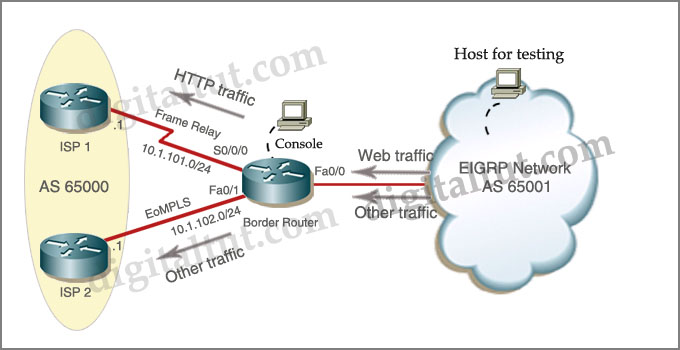
BGP_Policy_Based_Routing_Sim.jpg


Answer and Explanation:

Notice: The answer and explanation below are from PeterPan and Helper.Please say thank to them!

All the HTTP traffic from the EIGRP Network should go through Frame Relay link if available and all the other traffic should go through either link.
The only router you are able to administrate is the Border Router, from the EIGRP Network you may only send HTTP traffic. As the other people mentioned, actually it is not a BGP lab. You are not able to execute the command “router bgp 65001″

1) Access list that catches the HTTP traffic:
BorderRouter#access-list 101 permit tcp any any eq www

Note that the server was not directly connected to the Border Router. There were a lot of EIGRP routes on it. In the real exam you do not know the exact IP address of the server in the EIGRP network so we have to use the source as “any” to catch all the source addresses.

2) Route map that sets the next hop address to be ISP1 and permits the rest of the traffic:
BorderRouter(config)#route-map pbr permit 10
BorderRouter(config-route-map)#match ip address 101
BorderRouter(config-route-map)#set ip next-hop 10.1.101.1
BorderRouter(config-route-map)#exit
BorderRouter(config)#route-map pbr permit 20

(Notice: the route-map pbr permit 20 line allows other traffic than HTTP to be routed. Otherwise, other traffic will be dropped)

3) Apply the route-map on the interface to the server in the EIGRP Network:
BorderRouter(config-route-map)#exit
BorderRouter(config)#int fa0/0
BorderRouter(config-if)#ip policy route-map pbr
BorderRouter(config-if)#exit
BorderRouter(config)#exit

4) There is a “Host for Testing”, click on this host to open a box in which there is a button named “Generate HTTP traffic”. Click on this button to generate some packets for HTTP traffic. Jump back to the BorderRouter and type the command “show route-map”.

BorderRouter#show route-map

In the output you will see the line “Policy routing matches: 9 packets…”. It means that the route-map we configured is working properly.

Other lab-sims on this site:

EIGRP Stub Sim

OSPF Sim

EIGRP OSPF Redistribution Sim

IPv6 OSPF Virtual Link Sim

EIGRP Simlet

Comments
Comment pages
1 2 3 4 28
  1. n1c
    December 28th, 2011

    The question says to force “All the HTTP traffic from the EIGRP Network” so we are catching traffic sourced in the network on fa0/0 on Boader router. So to match sourced HTTP traffic should the access list not read :-

    access-list 101 permit tcp any eq www any

    ie match traffic with a source tcp port of 80 – not a destination port

  2. ME
    December 29th, 2011

    HI all i will write exam tomorrow who passed the exam please tell me that how many labs are there in exam 4 or 5 please answer me please.

  3. VED
    December 29th, 2011

    Hi All

    I passed the exam today !!! Many of You know Me Last time When I passed The CCNA exam I remember All the Question and i send to you all also and its very helpfull to U all !!! Dont Worry Friends this time Also I remember All the Question !!! In exam I got 50 question

    Out of that three are Similator
    2 drag and drop

    Friends Any one Want the Question Please Update the Mail Id Or Send the Mail to the mail id : dononearth0@gmail.com ( as u know )

    Better U send the Mail So that I can Quick reply to You All

    Help other God will help You !!!

    Ur Friend Ved Prakash INDIA

  4. BLIKVI
    January 3rd, 2012

    Friends, how many hotspots are in the exam ? and could anyone share it ?

    Thank you in advance

  5. maxboy
    January 4th, 2012

    Visit the Following link to download CISCO GNS3 IOS images for these labs

  6. Tony
    January 4th, 2012

    @n1c because we apply the PBR route-map to interface fa0/0 this will process packets on an inbound direction only i.e whatever comes from the EIGRP AS hence the access list is permissible.

  7. s s s
    January 5th, 2012

    THANK YOU SHAHID to share me latest dump, i passed yesterday i used dumps nonentity.338q.vce or actual test v 6.2 all questions from those dumps those are 100% valid and sims are from digitultut.com same sims only ip address and are change,4 sims ( Eigpr and ospf redistribute / ospf stub / ipv6 virtual-link / pbr ) and read question carefully.
    latest dumps actual test v 6.2 link http://www.4shared.com/office/J1iP8WU_/642-902.html .

  8. g-shock
    January 5th, 2012

    i did this config on my exam this afternoon:

    BorderRouter(config)#int fa0/1
    BorderRouter(config-if)#ip policy route-map pbr
    BorderRouter(config-if)#exit

  9. Ahmed
    January 7th, 2012

    @g-shock, so the link from the eigrp network into BorderRouter was through interface fa0/1 in the real exam, and not fa0/0 as depicted above?

  10. Anonymous
    January 10th, 2012

    I got this lap today
    and when i wrote the command show route-map
    i got zero packets

    Policy routing matches: 0 packets

    tired it many times
    same thing.

  11. arun
    January 11th, 2012

    HI

    I have a query when it is asked that the http traffic will be routed via FR link IF AVAILABLE does not that means we need to track the OBJECT and if it is up then the traffic will be routed …

  12. dabba
    January 13th, 2012

    @arun. No it doesn’t mean we gotta track the object. if you read this chapter in cisco press official cert guide you will see clearly stated that it will go that direction but if that link is down it will default back on regular path in routing table. even in the “do i know this already” quiz in one of the chapters a question is about this same thing..actually in answer description it says it too

  13. Amr Bahgat
    January 14th, 2012

    i think under the “route-map pbr permit 20″ we mut configure set ip next-hop 10.1.102.1 to insure that the rest of traffic (other than http) is routed through the other ISP..

    please any one correct me if i am wrong..

  14. Anonymous
    January 14th, 2012

    NO BECAUSE HE ASK THAT ALL TRAFFIC GO THROUGH BOTH INTERFACES

  15. Amr Bahgat
    January 15th, 2012

    i ve passed the exam yesterday with 988, dear all who didnt take the exam yet,(regarding the ospf lab) take care to configure the “stub area no summary” after finishing all the other configuration as in my exam when i configured this command 1st the nighbourship was DOWN even after i configured the other interface with area stub.

    Good Luck all..

  16. Amr Bahgat
    January 15th, 2012

    i had all the 5 sim\ in my exam, exam was 50 Questions only.

  17. Steve
    January 16th, 2012

    Dear all..,

    I faced one problem it’s router can’t start in gns3?Could you provide me cisco2621XM router’s IOS image by URL link??

  18. Anonymous
    January 18th, 2012

    Hello Friends,

    I just started to study the ROUTE test after taking almost two years off from passing the CCNA. I am planning to take the ROUTE test in two months. Are the Sims, Drag and Drop, Questions, and everything else on this site still valid for the ROUTE test?

    Thank you all!

  19. Subbin
    January 18th, 2012

    Hello friends,

    I m going to write Route exam End of the Month.

    Please help and share the latest Dumps and also put of valuable inputs to crack the exam. For more information you can shoot a mail @ subbin_s@rediff.com

    Thanks & Regards
    Subbin

  20. lesgy
    January 20th, 2012

    wen i ‘show route-map’ i still got ‘Policy routing matches: 0 packets’ tried it several times please i need urgent reply my exam is tomorrow

  21. melo
    January 20th, 2012

    I have booked the day for ccnp_route-exam.
    Could anybody help me about sim_labs(are these labs same in official exam?)

  22. Mohamed
    January 20th, 2012

    @lesgy

    it is normal that you get ‘Policy routing matches: 0 packets’ because you cannot generate HTTP traffic with gns3, instead you can generate ICMP traffic with the ping command. To do that you must replace the command [access-list 101 permit tcp any any eq www] with the command [access-list 101 permit icmp any any echo] , but be VERY VERY carefull in the exam day NOT to use the second command otherwise you will get ZERO mark : this command is to be familiar with the concept only.

    Good luck ! ! !

  23. Anonymous
    January 21st, 2012

    Well does anyone knows if it is possible to do >>debug ip policy << on border router to confirm that web traffic is policy routed.

    Even if you not add route-map pbr permit 20 traffic not specifically permited by route -map sequency number 10 other traffic will not be dropped but it will be routed normally and it willnot be policy routed.That is how policy based routing works.

  24. Anonymous
    January 21st, 2012

    Yes I agree it is still good idea to add that statement <>

  25. miles
    January 22nd, 2012

    @ Mohamed @ lesgy
    You can generate HTTP trafic on GNS3. HOW.
    You can put router and configuration as PC , stop ip routing under global config. Config the router with gateway. After you do this telnet to the ISP 1 with this command
    # telnet 10.1.101.1 80 . Include port 80 so the traffic will get destination to port 80. The router will stuck just type something which means you are sending some packets on port 80 and than check with show route-map, you will see the packets are matched. You will be sure that access-list is matching the traffic with ip destination 10.1.101.1 on port 80. I hope this did help you . Thx Miles

  26. Jelooos
    January 22nd, 2012

    It is able to generate HTTP traffic on GNS3 guys,!!!
    use telnet 10.1.101.1 80, as what miles said,
    i have exam today, ill reply back on it, !!

    good luck wif u guys

  27. .
    January 24th, 2012

    @ Anonymous on Jan 21

    Yes, you can test the policy by enabling debug ip policy on the Border Router in your GNS3 Digitaltut.

    First, on the Border Router, create a standard ACL which identifies Console’s Default-Gateway or LANs if any (in this case the default-gateway is 192.168.0.2).

    Next, issue a ‘debug ip policy’ command on your Border Router.

    Next, on your Console Router, do a traceroute.

    Go back to Border Router, you can see a bunch of messages coming up.

    Lastly, on your Border Router, issue a ‘show route-map’ command. You can see there are 48 packets matched in the policy routing.

    BORDER_ROUTER#sh route-map
    route-map PBR, permit, sequence 10
    Match clauses:
    ip address (access-lists): 101
    Set clauses:
    ip next-hop 10.1.101.1
    Policy routing matches: 0 packets, 0 bytes
    route-map PBR, permit, sequence 20
    Match clauses:
    Set clauses:
    Policy routing matches: 48 packets, 3720 bytes
    BORDER_ROUTER#

    BORDER_ROUTER#conf t
    Enter configuration commands, one per line. End with CNTL/Z.
    BORDER_ROUTER(config)#access-list 1 permit 192.168.0.0 0.0.0.255
    BORDER_ROUTER(config)#exit
    BORDER_ROUTER#de
    *Mar 1 00:11:45.943: %SYS-5-CONFIG_I: Configured from console by consolebug ip policy 1
    Policy routing debugging is on for access list 1
    BORDER_ROUTER#
    *Mar 1 00:12:08.743: IP: s=192.168.0.2 (FastEthernet0/0), d=255.255.255.255, len 69, policy match
    *Mar 1 00:12:08.747: IP: route map PBR, item 20, permit
    *Mar 1 00:12:08.747: IP: s=192.168.0.2 (FastEthernet0/0), d=255.255.255.255, len 69, policy rejected — normal forwarding
    *Mar 1 00:12:11.751: IP: s=192.168.0.2 (FastEthernet0/0), d=255.255.255.255, len 69, policy match
    *Mar 1 00:12:11.755: IP: route map PBR, item 20, permit
    *Mar 1 00:12:11.755: IP: s=192.168.0.2 (FastEthernet0/0), d=255.255.255.255, len 69, policy rejected — normal forwarding
    *Mar 1 00:12:14.747: IP: s=192.168.0.2 (FastEthernet0/0), d=255.255.255.255, len 69, policy match

    Console#traceroute 10.1.101.1 source 192.168.0.2

    Type escape sequence to abort.
    Tracing the route to 10.1.101.1

    1 192.168.0.1 20 msec 60 msec 52 msec
    2 10.1.101.1 20 msec 72 msec *

  28. Sunil
    January 24th, 2012

    passed today with 953, same sim were same as digitaltut.
    copy run start will not work, sh run int will not work.

  29. Mr.T
    January 24th, 2012

    Just a quick tip if you’re using GNS3, you can test this quite good by running “ip http server”
    on ISP1 and then from the eigrp network, do a telnet x.x.x.x 80 (which stands for telnet this ip address on port 80)

  30. ME
    January 26th, 2012

    @Mr.T
    can you elaborate little bit more on how to config on ISP1 “ip http server”

  31. caljacuto
    January 26th, 2012

    Passed 930/1000 Took exam 2 hrs ago, sims were IPV6 Virtual Link, Redistribution, Policy Based Routing, and EIGRP stub, no simlett or hotspot one D&D and a whole lot of questions not on this site. I got about 10 questions related to BGP that I had never seen before. Know your BGP is my recommendation.

  32. sreeji
    January 29th, 2012

    access-list creation is done on configure mode only!

  33. bishoy
    January 29th, 2012

    @all
    this config for lab pbr lab is correct or not ?then how to test this lab ?
    BorderRouter#access-list 101 permit tcp any any eq www
    BorderRouter(config)#route-map pbr permit 10
    BorderRouter(config-route-map)#match ip address 101
    BorderRouter(config-route-map)#set ip next-hop 10.1.101.1
    BorderRouter(config-route-map)#exit
    BorderRouter(config)#route-map pbr permit 20
    BorderRouter(config-route-map)#exit
    BorderRouter(config)#int fa0/0
    BorderRouter(config-if)#ip policy route-map pbr
    BorderRouter(config-if)#exit
    BorderRouter(config)#exit
    please reply

  34. Mike
    January 30th, 2012

    bishoy…

    Yes is the correct configuration…

    Regards

  35. gaurav
    January 31st, 2012

    Hello friends,
    I m going to write Route exam End of the Month.
    Please help and share the latest Dumps and also put of valuable inputs to crack the exam. For more information @ gaurav.dhargalkar@gmail.com

    Thanks & Regards
    gaurav

  36. wheelman
    January 31st, 2012

    I set this lab up and I am not sure if it works. I DO get packets like it says I should. But when I telnet to 10.1.102.1 80 it works too. Using Wireshark I see http port 80 packets going to 10.1.102.1 still. Isn’t the policy supposed to stop all port 80 traffic to 10.1.102.1?

    I set up a MS LoopBack adapter on my PC and connected it to GNS3. Now I can ping and www from my PC. When I load Firefox and type 10.1.101.1 I get the Cisco http screen. When I enter 10.1.102.1 I get he http of the 102 router. Shouldn’t I get redirected to the 101 router?

  37. boyi
    February 2nd, 2012

    @bishoy
    with this config i can telnet 10.1.102.1 port 80, and the route-map match teh packets, but i can not reach 10.1.102.2, why? route-map pbr permit 20 should permit other traffic and i don’t know why. please, somebody knows why?

  38. boyi
    February 2nd, 2012

    Sorry, i typed the wrong ip address. i can telnet 10.1.101.1 port 80 from testing host, and i can do the same with 10.1.102.1, but only the Policy routing matches increase in sequence 10 of the show route-map output. i thought with this config only 10.1.101.1 port 80 should works increasing the counters in sequence 10, shouldn’t works for 10.1.102.1 port 80 (because is http) and other traffic such telnet 10.1.102.1 should works increasing sequence 20 counters.

    i don’t understand :)

  39. boyi
    February 2nd, 2012

    I don’t understand what happened, but i stopped all the routers, start and config again, and it works. telnet to 80 port of 10.1.101.1 match route map sequence 10, ping to 10.1.102.1 much sequence 20.
    the only thing i changed was access-list 101 permit tcp any any eq www (instead www i used 80)

  40. Jorge Allen Adajar
    February 4th, 2012

    I passed the exam yesterday :-) and this lab was appeared on the exam :-)
    but i don’t know if i got perfect on this lab, because although i did the correct configurations, but every time that i clicked the HTTP process from the host, i tried to check if the match statement from route-map will increase, but still 0 value, is it needs to have a value than 0?

    Good luck and God Bless

Comment pages
1 2 3 4 28
  1. No trackbacks yet.
Add a Comment