
IPv6 OSPF Virtual Link Sim
Question
TUT is a small company that has an existing enterprise network that is running IPv6 OSPFv3. However, R4’s loopback address (FEC0:4:4) cannot be seen in R1. Identify and fix this fault, do not change the current area assignments. Your task is complete when R4’s loopback address (FEC0:4:4) can be seen in the routing table of R1.
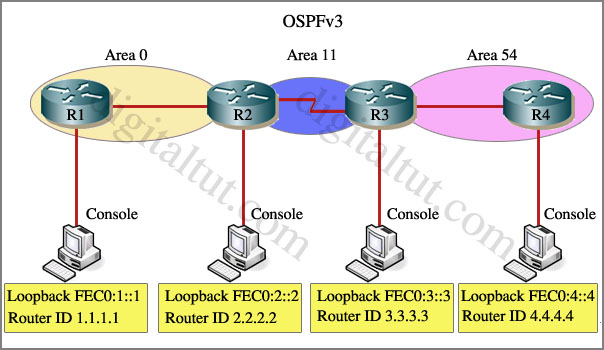
Special Note: To gain the maximum number of points you must remove all incorrect or unneeded configuration statements related to this issue.
Answer and Explanation:
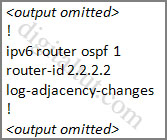
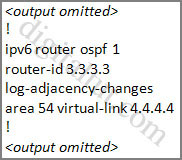
To troubleshoot the problem, first issue the show running-config on all of 4 routers. Pay more attention to the outputs of routers R2 and R3
The output of the “show running-config” command of R2:
The output of the “show running-config” command of R3:
We knew that all areas in an Open Shortest Path First (OSPF) autonomous system must be physically connected to the backbone area (Area 0). In some cases, where this is not possible,we can use a virtual link to connect to the backbone through a non-backbone area. The area through which you configure the virtual link is known as a transit area. In this case, the area 11 will become the transit area. Therefore, routers R2 and R3 must be configured with the area area-id virtual-link neighbor-router-id command.
+ Configure virtual link on R2 (from the first output above, we learned that the OSPF process ID of R2 is 1):
R2>enable
R2#configure terminal
R2(config)#ipv6 router ospf 1
R2(config-rtr)#area 11 virtual-link 3.3.3.3
(Notice that we have to use neighbor router-id 3.3.3.3, not R2’s router-id 2.2.2.2)
+ Configure virtual link on R3 (from the second output above, we learned that the OSPF process ID of R3 is 1 and we have to disable the wrong configuration of “area 54 virtual-link 4.4.4.4”):
R3>enable
R3#configure terminal
R3(config)#ipv6 router ospf 1
R3(config-rtr)#no area 54 virtual-link 4.4.4.4
R3(config-rtr)#area 11 virtual-link 2.2.2.2
We should check the configuration on R4:
R4>enable
R4#show running-config
You will see a wrongly configured virtual-link command. To get full mark we have to disable this command:
R4#configure terminal
R4(config)#ipv6 router ospf 1
R4(config-rtr)#no area 54 virtual-link 3.3.3.3
After finishing the configuration don’t forget to ping between R1 and R4 to make sure they work well!
Now all the configuration was done. But we still cannot ping the IPv6 loopback interface of R4 from R1 because the IPv6 loopback interface of R4 has not been advertised into OSPFv3. But we can check by using the command show ipv6 route on R1. If you can see the IPv6 loopback interface of R4 then you don’t need to do anything else.
But in real routers, we have to advertise the IPv6 loopback interfaces of R1 & R4 into OSPFv3 to make them appear in the routing tables with the following commands:
|
R4(config)#int loopback 0 R1(config)#int loopback 0 |
Again, the above commands should only be used when you don’t see the IPv6 loopback interface of R4 in the IPv6 routing table of R1 as the exam requirement.
The copying running-config startup-config command will not work but don’t worry, just skip it.
Notice: If you issue the command “show running-config” on R1, you will see these two lines:
passive-interface default
no passive-interface fa0/0 (fa0/0 is the interface connecting with R2)
These two lines make all the interfaces of R1 become passive interfaces except interface fa0/0. They are correctly configured so don’t try to disable them.
Other lab-sims on this site:


Just like a summary, i recreated the lab in GNS3, with the given running config.
Only thing i needed to remove for this to work (FEC4::4 to be seen in R1) is to
A) remove area virtual-link command in R4
b) remove area virtual-link command in R3 and replace with
area 11 virtual-link 2.2.2.2
c) add following command in R2:
area 11 virtual-link 3.3.3.3
And that is ALL. i put also loopback in R1 in area 11, but of course i can still see it in R4 as O IA. They dont ask to modify anything , they just want you to ping from R1 to R4 and that is all.
Whatever you guys modify int he running-config and is not asked, it takes off points.
R1#show ipv6 route ospf
IPv6 Routing Table – default – 6 entries
Codes: C – Connected, L – Local, S – Static, U – Per-user Static route
OI FEC0:2::2/128 [110/1]
via FE80::C802:50FF:FE5C:8, FastEthernet0/0
OI FEC0:3::3/128 [110/65]
via FE80::C802:50FF:FE5C:8, FastEthernet0/0
OI FEC0:4::4/128 [110/66]
via FE80::C802:50FF:FE5C:8, FastEthernet0/0
R1#ping FEC0:4::4
Type escape sequence to abort.
Sending 5, 100-byte ICMP Echos to FEC0:4::4, timeout is 2 seconds:
!!!!!
R4#ping fec0:1::1
Type escape sequence to abort.
Sending 5, 100-byte ICMP Echos to FEC0:1::1, timeout is 2 seconds:
!!!!!
Success rate is 100 percent (5/5), round-trip min/avg/max = 60/63/64 ms
I passed today…this Sim was on the schedule. Thanks!
From R1 do “show running-config” or “sh run”. What is the correct configuration for router eigrp 100?